
Most weeks the blog post opens with a new API I want you to know about. This week I want to open with a correction instead: if you shipped to an iPhone 14 Pro — or any iPhone newer than that — your density calculations have quietly been wrong until now.
The other thing worth calling out up front is that Codename One now delivers the performance benefits Java developers have been waiting on from Project Valhalla and the Vector API (JEP 460): portable SIMD, and hot-loop buffers that skip the heap entirely. Both of those are features I am genuinely looking forward to in standard Java. Neither is available to us today. Rather than wait, we built what we needed — and Codename One’s Base64 on iOS is now comfortably faster than Apple’s native implementation as a result. That work is at the end of this post because it deserves real space.
The iOS PPI Table Was Out of Date
The iOS port converts between physical millimetres and pixels using a per-device PPI lookup keyed on the screen’s pixel dimensions. That table had not been updated in a long time.
Missing entries included:
- iPhone 14 Pro, 15, 15 Pro, 16 (2556 × 1179 at 460 ppi)
- iPhone 14 Pro Max, 15 Plus, 15 Pro Max, 16 Plus (2796 × 1290 at 460 ppi)
- iPhone 16 Pro (2622 × 1206 at 460 ppi)
- iPhone 16 Pro Max (2868 × 1320 at 460 ppi)
- iPhone 12 Pro Max, 13 Pro Max, 14 Plus (2778 × 1284 at 458 ppi)
All of those devices fell through to the unknown-device fallback, which was a 2014-era value of 19.25429416 (roughly the iPhone 6 Plus at 401 ppi). For anything mm-based in your theme — borders, padding expressed in physical units, icon sizes measured that way — the rendered dimensions were off by a noticeable margin on every modern non-Plus iPhone.
The table is now current, and the fallback for unknown 3× devices defaults to 460 ppi. Apple has held that density steady for every non-Plus iPhone since the iPhone 12, so when a new model ships with an unrecognised resolution, the fallback will be correct to within a few percent instead of off by thirty.
If you were compensating for this in your own theme with magic numbers, this is a good moment to reassess.
Previewing Larger Fonts in the Simulator
A personal aside: my eyes are not what they used to be. Somewhere in the last few years I stopped being able to read small text on my phone/laptop the way I used to, and over time I have found myself quietly cranking the system font size up a notch, then another notch. This is extremely common. If your app has more than a handful of users over forty, a non-trivial percentage of them have the iOS text-size slider pushed well past its default, and some of them have the Larger Accessibility Sizes toggle turned on entirely.
The JavaSE simulator now has a Simulate → Larger Text menu that lets you preview exactly what those users see. It exposes every iOS text-size stop — from Extra Small (0.82×) through Large (1.00×, the default) up to Extra Extra Extra Large (1.35×), plus the five Larger Accessibility Sizes that go as high as 3.12×. The simulator returns the same ratio UIFontMetrics would report on the matching device, so what you see in the simulator matches what shows up on hardware.
The selected stop persists across simulator restarts. Leave it on an accessibility setting for a few days and the layout issues that never come up during your own daily testing will find you on their own.
If you have ever had a user report that “the text is huge on my phone and the layout is broken” and failed to reproduce it, this is the tool. On iOS the usual culprit is Larger Accessibility Sizes being turned on, because those stops start at 1.65× and exceed what the standard Display & Brightness slider can even reach.
iOS Scroll, One More Time
Scroll feel on iOS has been through more iterations in this framework than I can reliably count. Every time I have thought we had it right, somebody would flick a list on a new device and the whole thing would feel half a beat off. Too much rubber band. Not enough. Snap-back that arrived with a thud instead of settling. Deceleration that looked right in isolation and wrong next to Safari.
This is another attempt. I think it is the most principled one we have had, and my hope is that it is the one that settles the question.
The rewrite models scroll physics in three explicit stages, each tunable via theme constants:
- While the finger drags past an edge, the over-edge distance is compressed by the iOS
UIScrollViewrubber-band functionc * d * dim / (c * d + dim). Content feels heavier the farther you pull it, asymptotically approaching the viewport dimension.rubberBandCoefficientIntcontrols the curve (default55, interpreted as hundredths —0.55is the iOS reference value). Reduce it toward35for a stiffer feel. - After the finger lifts, while there is still velocity, the
ScrollMotionconstant picks the model.DECAY(the default) uses exponential velocity decay with a time constant ofScrollMotionTimeConstantIntmilliseconds (default500) and a distance scale ofDecayMotionScaleFactorInt(default950). The legacy linear-friction model is still available by settingScrollMotion=FRICTION. - When the scroll comes to rest past an edge, a tensile snap animates the content back.
tensileSnapMotion=SPRINGapplies a critically-damped envelope that settles softly (this is the new default wheniosScrollMotionBool=true);DECELERATIONkeeps the legacy quadratic ease-out.
iosScrollMotionBool is the single switch that flips stage 1 and the default of stage 3 to the iOS-matching behaviour. It defaults to true on iOS only, but every individual constant is independently overridable. If you want iOS physics on Android for consistency, set iosScrollMotionBool=true explicitly. If you specifically want the nonlinear rubber band but the old quadratic snap-back, that combination is also available.
If this version finally feels right on your devices, I would love to hear about it. If it does not, the constants above are where to start looking.
Localized App Icons
Another long-standing request that landed this week: per-locale launcher icons on iOS and Android.
The workflow is file-driven. Drop per-locale PNGs into common/src/main/resources using the naming convention cn1_icon_<lang>[_<country>].png:
cn1_icon_fr.png— French (any region)cn1_icon_en_GB.png— British Englishcn1_icon_es_MX.png— Mexican Spanish
Supply a square source image of at least 432×432 pixels. The build resizes it to every target density.
On Android, the build generates locale-qualified resources (drawable-<lang>[-r<COUNTRY>]/icon.png at every density, and the matching mipmap-* entries when adaptive icons are enabled). Android’s resource framework then switches icons automatically based on the device’s current locale. No code changes required.
iOS does not natively localize launcher icons, so we wire up alternate icons instead. The build emits per-locale images at @2x, @3x, and iPad sizes; injects a CFBundleIcons / CFBundleIcons~ipad block into Info.plist with a CFBundleAlternateIcons dictionary; and patches the app delegate to call -[UIApplication setAlternateIconName:completionHandler:] at launch based on [NSLocale preferredLanguages]. It tries the full <lang>_<COUNTRY> key first, falls back to the language-only variant, and reverts to the default if nothing matches.
One thing to be aware of: iOS displays a system alert the first time an app switches to an alternate icon. That is platform-standard behaviour. We cannot suppress it, and we shouldn’t try.
UIManager.zoomFonts(factor)
The missing piece alongside the simulator Dynamic Type menu was a programmatic way to apply a scale at runtime. UIManager.zoomFonts(factor) does exactly that. It multiplies every scalable font in the current theme (and the default styles) by the factor you pass:
UIManager.getInstance().zoomFonts(1.2f); // 20% larger
UIManager.getInstance().zoomFonts(0.8f); // 20% smaller
System fonts are skipped because their size is fixed by the platform — there is nothing to scale. The styles cache gets cleared so subsequent components pick up the new sizes. For already-displayed forms, you still need to call Form.refreshTheme() to re-layout; the Javadoc spells that out.
Combined with the simulator’s Larger Text menu, the pipeline for “show me what the app looks like for a user at accessibility text size 3” is now one preview click and, if needed, one line of code.
Playground: New UI, More Java
The biggest Playground change this week is visible the moment you open it. The whole UI has been redesigned.
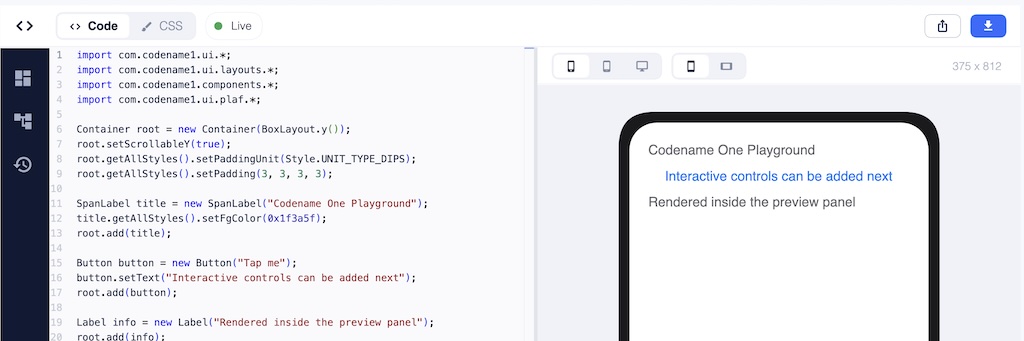
The short version: it now feels like a modern developer tool. The design vocabulary is closer to the current IntelliJ or Visual Studio Code than to “scripting textarea with a preview pane bolted on.” It just feels like a real product now.
The piece I am most pleased about is the preview. Until this week, the preview area was essentially code rendered in a rectangle — functional, but it always looked like code the scripting runtime happened to be evaluating. The new preview shows your app inside a device skin with properly rounded corners, at a genuine device viewport, with device / tablet / desktop and orientation toggles sitting above it. It reads as “your app running on a phone”, not as “some code a sandbox is running.” A new bundled Android preview theme also means that toggling the preview to Android gives you a theme that actually resembles an Android app instead of the default iOS palette showing through.
Underneath the new chrome, the BeanShell layer that runs user code also got better. try-with-resources now parses and evaluates — including the no-catch/no-finally form and local AutoCloseable resources. Inline class declarations work for scripted classes. Superclass invocation correctly propagates checked exceptions and target exceptions. And the rewriting pass that used to lean on reflection and regex has been replaced with Codename One’s own RE and StringUtil — Playground snippets compile and run in the actual CN1 runtime, and the cleaner the surface, the closer the experiment is to the production code it will eventually become.
The SIMD API — An Advanced Topic for Those Who Want to Dig Deep
This section is long, and the audience for it is narrow. If you just want faster apps without thinking about it, you already have them — Base64 and parts of the Image API call into Simd internally, and the numbers at the end of this section are what you get for free. Keep scrolling to the closing thoughts.
If you do hot-loop work — image processing, codecs, custom compositing, audio mixing, cryptographic primitives, anything where you spend significant time inside a tight loop over a primitive array — the rest of this section is for you.
What SIMD Actually Is
SIMD stands for Single Instruction, Multiple Data. Modern CPUs have wide registers (128 bits on ARM NEON and x86 SSE, wider on AVX and SVE) that can hold several values packed side by side: sixteen bytes, eight 16-bit integers, four 32-bit integers, or four 32-bit floats. One instruction — VADD on NEON, PADDD on SSE — then operates on every packed lane in parallel.
The diagram below is the whole idea in one picture. On the left, a normal scalar loop steps through the buffer one element at a time: four operations, four cycles. On the right, the same four pairs of inputs sit in a single wide register, and one instruction produces all four results at once.
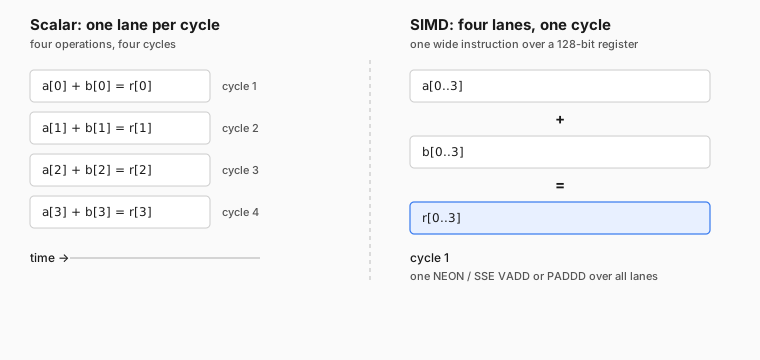
For workloads where the operation per element is simple and identical — Base64 encode/decode, pixel blending, alpha masks, colour-channel manipulation, table lookups, UTF-8 validation, checksums — this typically means a 3× to 10× speedup over the scalar version. For workloads with per-element branching, pointer chasing, or buffers smaller than a single SIMD register, it means nothing. SIMD is a data-parallel hammer; it is not a general-purpose one.
The Benefits We Are Eagerly Waiting For in Java
If you have been following recent OpenJDK work, this territory will sound familiar. The Vector API (JEP 460 and its successors) is still incubating in the JDK, and when it lands as a standard library it will give Java developers portable SIMD. Project Valhalla, separately, is reshaping the JVM so that value types and the buffers holding them can bypass heap allocation in hot paths — which matters precisely because SIMD workloads tend to live inside those hot paths.
Both of those are features I am looking forward to in standard Java. Neither is available to us today. The Vector API is still incubating, Valhalla is still years out.
For Codename One specifically, this is a huge problem. On Android it will be challenging to deliver something as ambitious as Valhalla or the Vector API. We need a route that will work today where the translator has to lower everything to C on iOS. So we built what was needed now.
com.codename1.util.Simd delivers the SIMD benefit today. The allocation helpers in the next subsection deliver the heap-free-hot-loop benefit today. The mechanisms are different from what Java will eventually have, but the outcomes that matter in the inner loop are the same.
Architecture
com.codename1.util.Simd is designed so you write the same code everywhere and get native speed on platforms that have native SIMD, and correct results on the ones that do not.
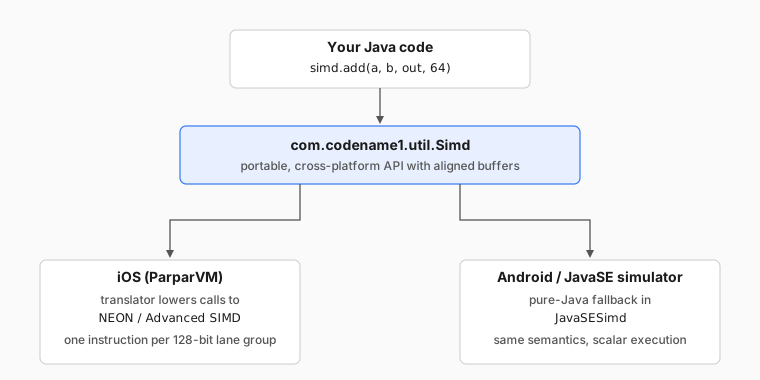
On iOS, the ParparVM translator lowers the calls to NEON intrinsics directly. On Android and the JavaSE simulator, JavaSESimd provides a pure-Java fallback with identical semantics. simd.isSupported() tells you whether the current platform is on the fast path; regardless of the answer, the results match.
Allocation: alloc vs alloca, and Why the Distinction Matters
SIMD loads and stores prefer — and on some architectures require — that the address they read from is a multiple of the register width. The JVM gives you no such guarantee for new byte[64]. That is why Simd exposes its own allocation helpers, and why passing an arbitrary new-allocated array is forbidden.
There are two families of helpers, and the distinction between them is the interesting part:
Simd simd = Simd.get();

// Heap-backed, aligned, lives as long as any reference to it.
byte[]  heapBytes  = simd.allocByte(64);

// Scratch buffer. On ParparVM this may be lowered to a
// stack-backed "faux array". Method-local use only.
byte[]  scratch    = simd.allocaByte(64);
allocByte / allocInt / allocFloat return ordinary heap arrays, just with alignment guarantees. Nothing unusual about their lifetime.
allocaByte / allocaInt / allocaFloat — note the extra a, and yes, the name deliberately echoes C’s alloca() — are a different beast. On ParparVM the translator is allowed to lower these into stack-allocated scratch buffers. No heap allocation. No GC pressure. No retained reference. The contents are undefined until you write them, and the moment the method returns, the backing memory is gone. This delivers the outcome Valhalla is aiming at — a hot-loop buffer that never lands on the heap or adds GC pressure — today, via an explicit opt-in.
For that to be safe, the value must never escape the method. The custom compliance validator we introduced a few weeks back to replace Proguard enforces this by walking the bytecode of any method that uses alloca*. If an alloca-derived value is:
- returned from the method
- stored into a static field
- stored into an instance field
- stored into an object array
- passed to any method that is not on
Simditself - passed to an
invokedynamiccall site
the compliance check fails with SIMD alloca value ... and tells you exactly where. The message is specifically Keep SIMD alloca scratch arrays method-local and only pass them to Simd methods.
This is the same compliance check that rewrites String.split(), injects StandardCharsets, and catches calls to unsupported JavaSE APIs — applied to a new problem. Without it, alloca* would be too dangerous to ship. With it, the common case — scratch buffers for a hot inner loop — is both fast and safe.
What You Get For It
The new Simd API is already wired into Base64 and several Image operations. The numbers on iOS speak for themselves.
Base64 is the headline. Last month we talked about closing the gap with Apple’s native implementation. This week, Codename One’s Base64 on iOS is comfortably faster than the native version:
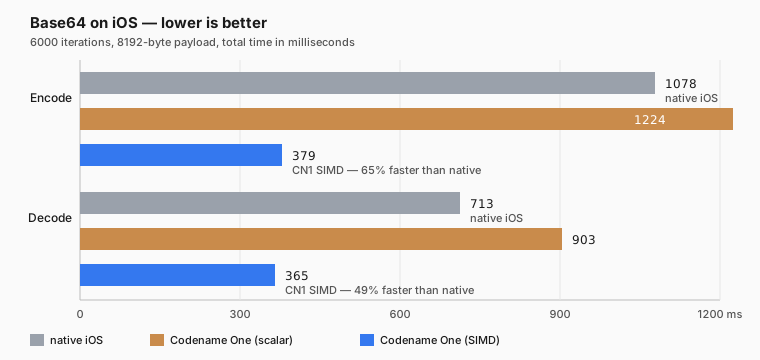
Over 6000 iterations on an 8192-byte payload:
| Metric | Time | vs. native iOS |
|---|---|---|
| Base64 native encode | 1078 ms | — |
| Base64 CN1 scalar encode | 1224 ms | 13.5% slower |
| Base64 CN1 SIMD encode | 379 ms | 64.8% faster |
| Base64 native decode | 713 ms | — |
| Base64 CN1 scalar decode | 903 ms | 26.6% slower |
| Base64 CN1 SIMD decode | 365 ms | 48.8% faster |
Against our own previous implementation, SIMD gives 69.0% faster encode and 59.6% faster decode.
Image processing follows a similar curve. Same SIMD on / SIMD off comparison on the same hardware:
| Operation | SIMD off | SIMD on | Speedup |
|---|---|---|---|
createMask | 56 ms | 10 ms | 82.1% faster |
applyMask | 129 ms | 56 ms | 56.6% faster |
modifyAlpha | 132 ms | 54 ms | 59.1% faster |
modifyAlpha (removeColor) | 136 ms | 63 ms | 53.7% faster |
| PNG encode | 919 ms | 762 ms | 17.1% faster |
The PNG encode number is the most honest one in the table. PNG is dominated by DEFLATE, which is inherently serial and resists vectorisation. A 17% improvement is what SIMD can do for the compositing and filtering stages around the compressor; the compressor itself stays where it was. That asymmetry is a good reminder of what SIMD is and is not.
Everywhere the operation is genuinely data-parallel, the speedup is in the 50–80% range. That is what we were after.
Closing Thoughts
For a long time Codename One’s implicit pitch was “as good as native, but cross-platform.” That was the right framing at the time. It is no longer the framing I want.
We have spent enough years narrowing the gap that the gap, in the areas we most care about, is gone or going. Performance: Base64 on iOS is now faster in Codename One than in Apple’s own implementation, and SIMD gives us the headroom to push that across more of the image and codec paths over the coming months. Ease of development: the compliance work, the Playground rebuild, the simulator’s accessibility preview, and the way our tooling stays honest to the device — all of that adds up to a cross-platform loop that is meaningfully easier than wrangling two separate native toolchains and trying to keep them in sync. Next week I am hoping to push another part of the story forward in the area that has lagged the longest — look and feel — but more on that when it lands.
The pitch is no longer “as good as native.” The pitch is that cross-platform should be the better choice. Better for developers, because you ship one codebase, own your toolchain, and iterate faster. Better for end users, because the performance is genuinely there, the look-and-feel gap is closing fast, and the accessibility and localisation story now extends all the way down to things like per-locale launcher icons and Dynamic Type previews.
Next week we will talk more about the biggest pain point in Codename One: look and feel… and how it can exceed native too.
Discussion
Join the conversation via GitHub Discussions.